Thank You for Testing Booksnake!
Once you’ve tried Booksnake, we’d love to hear what you think. What features should we build next? What elements did you find confusing or frustrating? What potential do you see for Booksnake?
Apple has approved Booksnake for beta testing, but it’s still a work in progress. Let us know about any bugs or glitches you encounter. Email booksnakeapp@gmail.com or take a screenshot to start the TestFlight feedback process.
The Booksnake beta is available for iPhone and iPad, and requires iOS17 or newer.
For more information about Booksnake, visit the main project website.
How to Install Booksnake with TestFlight

1. Download TestFlight
On your iPhone or iPad, download TestFlight from the App Store. TestFlight is Apple’s app for installing and managing beta software.
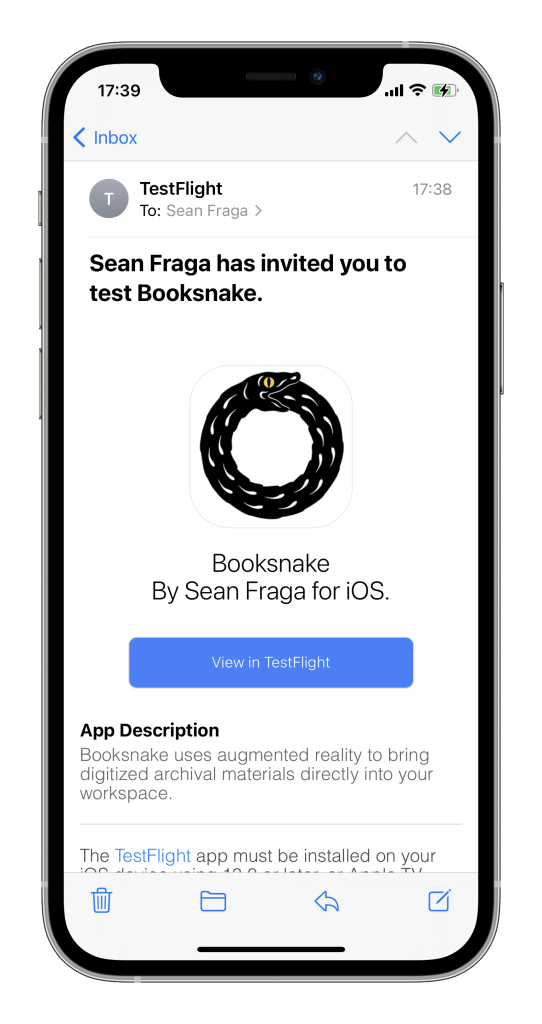
2. Accept Your Invitation
Open your invite email and tap the “View in TestFlight” button, then tap “Open” to open TestFlight.
If you haven’t yet installed TestFlight: Open your invite email, tap the “View in TestFlight” button, and copy your redeem code.

3. Install Booksnake from TestFlight
In TestFlight, tap Accept to accept the invitation. Then tap Install to download and install Booksnake, and tap Open to launch Booksnake.
If you have a redeem code: Open TestFlight, tap “Redeem,” and paste in your redeem code. Then install Booksnake from TestFlight.
 Booksnake